AppLock Pro - App Lock & Guard
- 4.4
- Rating
- 100.00M
- Installs
- Free
- Price
 Analysis by App-foxy
AppLock Pro - App Lock & Guard is the kind of productivity app that becomes interesting the moment your phone is passed to someone else. I installed it expecting a simple barrier around selected apps, but the more useful question turned out to be whether that barrier remains convenient after the first few days. Its purpose is straightforward: protect chosen apps with lock screens while letting you personalize the experience with themes and related options. That simplicity is both its appeal and its main limitation.
In my experience, this is not an app that transforms how you work. It adds a layer of control to a phone that may already contain private conversations, financial tools, photos, notes, or work accounts. The value comes from reducing accidental access rather than creating a complete security system. If you regularly lend your phone to family members, children, friends, or colleagues, that distinction matters. AppLock Pro is most useful as a practical privacy habit, not as a replacement for the phone’s built-in security.
How AppLock Pro feels after the first week
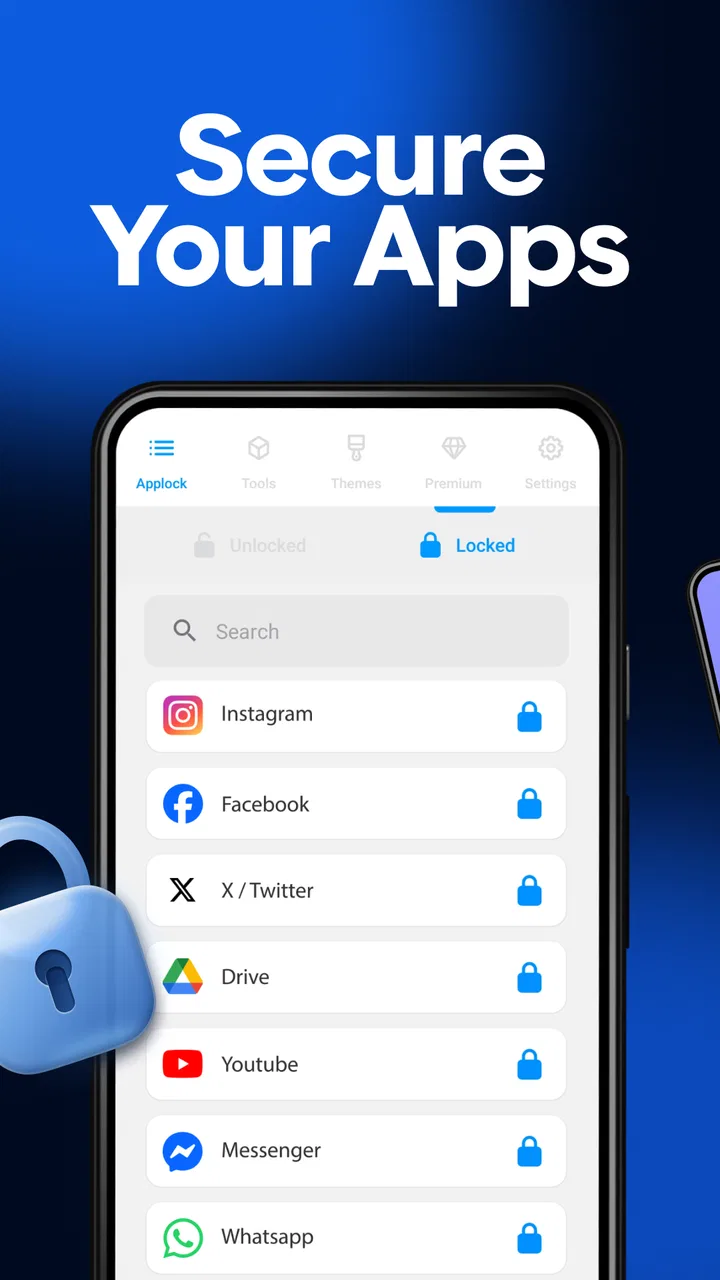
The first setup is easy to understand because the app has one central job. You choose which applications should require a lock screen, then use the protection when opening them. That focused approach feels less overwhelming than a large privacy suite filled with unrelated controls. I could imagine a new user getting a useful result quickly without needing to study a complicated dashboard.
In-Depth Coverage of AppLock Pro - App Lock & Guard
The custom themes are a small but worthwhile touch. A lock screen that looks less detached from the rest of the phone is easier to live with, especially when it appears repeatedly during the day. Themes do not change the underlying protection, but they make the experience feel more personal. This is where the app’s presentation helps: the lock screen becomes part of the phone’s routine instead of looking like an awkward interruption.
During the first week, the strongest use case is selective protection. Locking every application sounds safe, but it can make ordinary tasks irritating. I prefer protecting the apps where privacy has a real consequence, such as messaging, gallery, banking, password storage, or personal notes. Leaving low-risk tools accessible keeps the phone usable while still creating a meaningful boundary.
A realistic example is handing a phone to a child during a long journey. The child can use an entertainment app, but cannot casually open messages, photos, or shopping accounts. The same arrangement works when a friend wants to make a call or look something up. I do not need to hover over the screen, yet I also do not have to expose everything simply because the device is temporarily out of my hands.
That selective approach reveals an important trade-off. The app protects access to chosen applications, but it does not remove the need for good habits elsewhere. A person who leaves the phone unlocked, shares their device passcode, or approves every unexpected prompt is still depending on a weak overall routine. AppLock Pro adds friction at a useful point; it cannot make careless phone use safe by itself.
The product is free to start, which makes experimenting with a small group of protected apps reasonably accessible. Optional purchases range from under a dollar to almost one hundred dollars per item, so I would look carefully at the purchase screen before committing to anything. The free entry point is helpful for testing whether the extra lock screens fit your day, but the broad in-app purchase range means the long-term cost should be considered rather than assumed.
Its age rating is Everyone, which matches the basic nature of the tool. The developer is App Lock LLC, and the app has been available since May 30, 2018. That history gives it a more established feel than a brand-new utility, although longevity alone does not guarantee that every user will enjoy its workflow.
Choosing what deserves protection
One of my first practical lessons was to avoid treating the app list as a checklist where everything must be locked. The better method is to divide applications into three groups: private, occasionally shared, and harmless. The private group gets protection immediately. The occasionally shared group depends on how often other people use the phone. The harmless group stays open so basic navigation does not become a sequence of interruptions.
This matters particularly for notifications. Even if an application is locked when opened, sensitive information may still appear in a notification preview, depending on the phone’s own settings. I would therefore pair AppLock Pro with notification privacy controls for messaging and financial apps. The app is strongest when it is used as one layer in a broader routine, not when it is expected to hide every trace of private information.
Another useful workflow is temporary protection. If I know someone will borrow the phone, I can think about the specific applications that need guarding instead of permanently locking every service. That keeps the daily experience lighter. The downside is that a user who frequently changes the protected list may find the process tiresome. The app rewards a stable setup more than constant experimentation.
Whether it keeps earning its place month after month
After the novelty fades, the question becomes simple: do I still notice a practical benefit? For people who share a phone often, the answer is likely yes. The lock screen creates a clear pause before private content opens, and that pause is valuable when the device is being used in a social setting. It can also reduce the worry that someone will tap through an app out of curiosity or by accident.
For someone who never lends out a phone and already uses a strong device lock, the recurring value is less obvious. The extra barrier may feel redundant, particularly when the same person is the only regular user. In that situation, the app can become background decoration: installed, configured once, and rarely thought about. That is not a failure, but it means the product’s usefulness depends heavily on the user’s circumstances.
The large user base suggests that this need is common. AppLock Pro has passed one hundred million installs, with an average rating of 4.3 from around one point nine million ratings and about thirteen thousand written reviews. Those figures show broad adoption, but they do not settle the personal question of convenience. A widely used app can still be the wrong fit if its interruptions do not match your habits.
You May Also Like

 8 Ball Pool
 Is Built on Rivalries, Rematches, and Routine
A close look at the rivalries, rematches, shared routines, and unanswered safety questions that turn a quick pool match into a persistent mobile community.

 Samsung Music
’s Quiet Strength Is Playing What You Already Own
Its reach comes less from spectacle than from dependable access to a personal library. That simplicity is both the app’s strongest retention engine and its ceiling.

 AccuWeather: Weather Radar
AccuWeather Review: A Quick, Clear Forecast for Everyday Decisions
For everyday plans, the best forecast is the one you can understand quickly. AccuWeather makes rain timing, radar, and local conditions easy to act on, with a few trade-offs.

 Hill Climb Racing
Why Hill Climb Racing Still Turns Crashes Into One More Run
A tiny car, a bumpy hill and one more upgrade: Hill Climb Racing keeps resurfacing because its simple chaos makes every near-miss feel personal.

 AliExpress - Shopping App
AliExpress Makes Global Shopping Feel Personal, but Shoppers Bear the Risk
AliExpress turns a global marketplace into a pocket-sized discovery engine. Its reach is useful, its shopping loop compelling, and its trade-offs easy to miss.

 Lords Mobile: Kingdom Wars
Lords Mobile Is a Kingdom-Building Routine, Not a Quick Match
A case-by-case verdict on the building, battles, device demands, and social commitments that make Lords Mobile rewarding for some players and exhausting for others.
More From Our News Desk
View All News


Month-to-month value also depends on how many protected apps you choose. A small, carefully selected set is easier to remember and less likely to make the phone feel slow or fussy. A large protected set creates more visible privacy coverage, but it also increases the number of times you encounter the lock screen. I would start with the two or three applications that would cause the most trouble if opened by another person, then expand only if a real need appears.
This approach produces a useful maintenance rhythm. Every few weeks, I would review whether the protected list still reflects the way the phone is used. An app that was once private may no longer matter, while a newly installed service may deserve protection. The review should be brief and purposeful. If it turns into constant rearranging, the security benefit may be outweighed by the annoyance of managing it.
The difference between privacy and convenience
AppLock Pro sits in an awkward but understandable space between the phone’s system lock and a full privacy suite. The system lock protects the device as a whole and is usually the first line of defense. AppLock Pro adds protection after the phone has already been opened, which is useful when the owner wants to let another person use only part of the device.
Compared with a broad privacy or security suite, this app is more focused. That can be an advantage if I only want app-level lock screens and visual customization without adding a collection of unrelated tools. On the other hand, a full suite may be a better choice for someone looking for wider monitoring, account protection, or device-management features. AppLock Pro should be judged on the narrow problem it solves rather than on capabilities outside that purpose.
Compared with simply hiding an application, locking is more direct. Hiding can make an app less visible, but it does not necessarily create the same clear access barrier. Compared with using separate user profiles or guest modes, AppLock Pro can be quicker for occasional sharing, although a separate profile may offer a cleaner boundary when another person needs the phone for a longer period. The right choice depends on whether the situation is a quick handoff or a sustained shared-device arrangement.
What maintenance really involves
The app is not completely set-and-forget. The protected list needs occasional attention, and the user must remember the chosen access method. If the lock screen appears too often, the natural reaction is to remove protection from more apps. If it appears too rarely, the setup may not be doing enough. Finding the middle ground is the central maintenance task.
I would also keep the application updated when updates are available, especially because a lock tool sits close to private content. The current version is 5.6.8, and the minimum operating system requirement is Android 7.0. That makes it accessible to many Android users, but anyone using an older device should check compatibility before planning around it.
There is a psychological maintenance burden as well. Every extra lock screen asks me to make one more decision, even if that decision is only entering the chosen credential. When I am in a hurry, repeated prompts can feel like the app is working against me. This is why protecting only high-value applications is not merely a convenience tip; it is what makes the arrangement sustainable.
Custom themes can help the repeated interaction feel less monotonous, but they do not eliminate the interruption. I see them as a way to make the tool more pleasant, not as a reason to protect more applications than necessary. A polished lock screen still becomes tiring if it appears for every routine action.
Where fatigue starts to appear
The main source of fatigue is overprotection. Locking a calculator, weather tool, or map application may seem harmless at first, but small delays accumulate. If the phone is used frequently throughout the day, the user begins to notice each extra step. That is when a privacy app can move from reassuring to irritating, and irritation often leads people to disable it altogether.
Another possible frustration is the mismatch between a protected application and the information visible around it. A lock screen can stop someone from entering the app, but it does not automatically make the rest of the phone private. Notification previews, recent-app screens, widgets, screenshots, and shared media can still reveal context. I would configure those areas separately rather than assuming one app lock covers them.
There is also a trust issue with any application that sits between the user and other apps. I would read the permission prompts carefully and avoid granting access that does not make sense for the intended use. The app’s core idea is easy to understand, but privacy tools deserve more scrutiny than decorative utilities because their effectiveness depends on how they interact with the operating system.
People who need a completely invisible protection method may not enjoy the visible lock-screen experience. The point is to make access conditional, so the interruption is part of the design. Likewise, users seeking advanced device administration, parental controls across several devices, or a complete security dashboard should probably compare dedicated alternatives instead of expecting this focused tool to cover everything.
Purchase fatigue can be another consideration. The app is free, but in-app purchases are available from $0.99 to $99.99 per item. I would not buy anything simply because the setup feels incomplete during the first session. I would use the free experience long enough to learn whether the lock screens solve a real problem, then decide whether an optional purchase is worthwhile for my own routine.
Who should use it and who should skip it
I would recommend AppLock Pro to someone who regularly hands over an unlocked phone but wants to keep certain areas private. It is also a sensible fit for families sharing a device temporarily, people who keep personal and work information on the same phone, and anyone who wants a visible boundary around selected applications without adopting a larger security package.
I would be more cautious about recommending it to a person who already uses guest mode or separate profiles successfully. Those system-level options may provide a cleaner experience for longer borrowing sessions. I would also hesitate for users who dislike repeated prompts, rarely share their phones, or need protection for information that appears outside the locked applications.
For children, the app can help with accidental access, but I would not treat it as a complete parental-control solution. It can create a boundary around selected apps, yet responsible supervision still requires device settings and family rules suited to the situation. The Everyone rating makes the app broadly approachable, but the appropriate setup depends on who is using the device and why.
My long-term verdict
After the initial appeal wears off, AppLock Pro earns lasting space only when its lock screens solve a recurring problem. In my view, that is a reasonable standard for this kind of utility. It is not exciting software, and that is fine. Its success is measured by whether I can lend out my phone with less worry while keeping the daily experience manageable.
The best long-term setup is deliberately modest: protect the applications that contain genuinely private material, keep notification privacy in mind, avoid locking routine tools, and review the list occasionally rather than constantly. That arrangement turns the app from a blanket obstacle into a targeted safeguard. It also reduces the chance that frustration will lead to uninstalling it.
The product’s free availability makes testing straightforward, while the optional purchase range means I would approach upgrades carefully. Its established release history, current version 5.6.8, broad Android compatibility from version 7.0 onward, and large installed base make it an easy app to try, but none of those points replace personal fit.
My final recommendation is therefore conditional but positive. Keep it if you frequently share your unlocked phone and value selective privacy; skip it if your system lock or guest profile already handles that situation cleanly. The app has real recurring value for the first group, especially when configured with restraint. For everyone else, the extra lock screen may become one more daily interruption that does not justify its place on the device.
FAQs for AppLock Pro - App Lock & Guard
01What is AppLock Pro and how does it work?
AppLock Pro is a security application designed to protect your privacy on mobile devices. It allows you to lock apps using a password, pattern, or fingerprint, preventing unauthorized access. The app offers customizable lock settings for each application, ensuring that your personal data remains secure.
02Is AppLock Pro available for both Android and iOS?
AppLock Pro is available for Android devices. Unfortunately, there isn't an iOS version at the moment due to Apple's restrictions on app permissions. Android users can download it via the Google Play Store, providing a robust solution for app security and privacy.
03What features does AppLock Pro offer?
AppLock Pro includes a variety of features such as the ability to lock individual apps, hide photos and videos, and set custom lock themes. It also supports fingerprint authentication, fake covers, and an intruder selfie feature that captures images of unauthorized access attempts.
04Are there any subscription fees or in-app purchases in AppLock Pro?
AppLock Pro offers a free version with basic features. However, there are in-app purchases available for users who wish to upgrade to the premium version. This version includes additional features such as ad-free usage, advanced security options, and priority customer support.
05How user-friendly is AppLock Pro for new users?
AppLock Pro is designed with an intuitive interface that is easy to navigate, making it user-friendly for both beginners and advanced users. The app provides clear instructions and a simple setup process, allowing users to quickly secure their apps and personal data without any technical difficulties.
Pros
- User-friendly interface for easy navigation.
- Highly customizable locking options.
- Supports fingerprint and face unlock.
- Efficient battery usage.
- Wide range of supported apps.
Cons
- Ads can be intrusive at times.
- Limited features in free version.
- Occasional lag on older devices.
- No cloud backup for settings.
- Some features require in-app purchases.

AppLock Pro - App Lock & Guard
Gallery